Welcome to MotionMind
Why we built an agent skill, a CLI and a local Studio for making videos with the AI agent you already use, and how to make your first one.
Experiments, runs, parameters, metrics, artifacts and the model registry: how MLflow's ideas became the way MotionMind Studio records, compares and promotes every render.
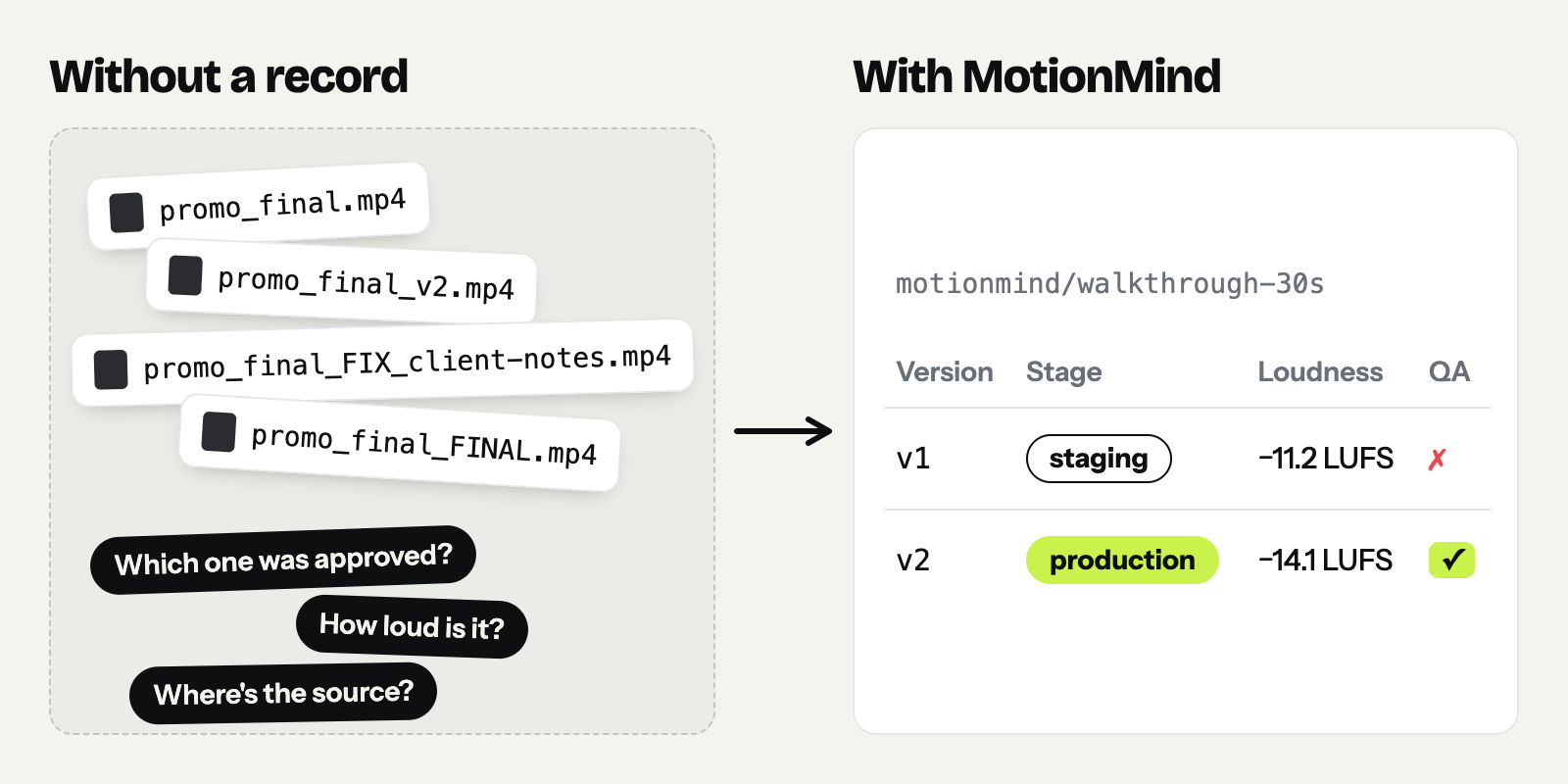
Open any video team's export folder. You will almost certainly find promo_final.mp4, promo_final_v2.mp4 and promo_final_FIX_client-notes.mp4. Nobody is sure which one was approved, how loud it is, or which source produced it. Once an AI agent starts making the videos, the problem arrives faster, because an agent can turn out five variations in an afternoon.
Machine learning ran into the same problem first, and one of its most popular answers is MLflow. In the launch post we said that MotionMind borrows from MLflow, and summed it up in a short table. This post takes that table apart row by row: which concepts we borrowed, what they look like on disk and in the Studio, why they fit video, and what we deliberately left out.
Every bit of terminal output below comes from a real run of MotionMind 0.2.0, not a mock-up.
If you have never used MLflow, here is the short version. MLflow is an open-source platform for managing the life cycle of machine-learning models. Two parts of it matter here: Tracking and the Model Registry.
In MLflow Tracking, every time someone trains a model, the result is recorded as a run. Runs are grouped into an experiment, such as "churn prediction". Each run stores:
mlflow ui opens a dashboard where you can browse every run, filter them and compare several side by side. mlflow.autolog() records runs automatically from supported libraries, with no extra code.
The Model Registry is the next step. Out of dozens of runs, one model is chosen to be used. Each model version in the registry carries a marker, which in classic MLflow is a stage: Staging, Production or Archived. That way everyone knows which version is live and which has been retired. Newer MLflow releases recommend aliases and tags instead of stages, but the idea is the same: one clear marker for "the version we use".
Why we built an agent skill, a CLI and a local Studio for making videos with the AI agent you already use, and how to make your first one.
Start with MotionMind now, and track every version with your AI agent.
Boiled down, the philosophy is four steps: never overwrite an experiment, record everything, measure the result, then choose explicitly.
Making videos with an AI agent turns out to be a lot like training models.
Same problem, so the solution can be borrowed.
Here is each MLflow concept, its MotionMind counterpart and where it lives.
| MLflow | MotionMind | Where it lives |
|---|---|---|
tracking store (mlruns/) | workspace | motionmind.store.json, registry.json |
| experiment | campaign <brand>/<campaign> | projects/<brand>/<campaign>/ |
| run | version v<N>-<slug> | runs/v<N>-<slug>/ + one entry in registry.json |
| parameters | params | concept, hook, CTA, aspect ratio, composition, variables, --param |
| metrics | metrics | ffprobe and EBU R128 measurements, plus --metric |
| artifacts | artifacts | video.mp4, contact sheet, breakdown.md, src/ snapshot |
mlflow.log_* | motionmind log | CLI |
mlflow.autolog() | motionmind track + ui/watch | tracked projects |
mlflow ui | motionmind ui | 127.0.0.1:4310 |
| model registry stages | staging → production → archived | motionmind promote |
The sections below go through each row.
MLflow keeps runs in an mlruns/ folder or on a tracking server. MotionMind keeps them in the workspace that motionmind setup creates:
my-studio/
├── motionmind.store.json        # workspace marker + list of tracked projects
├── registry.json                # every logged run; only the CLI writes it
├── projects/<brand>/<campaign>/
│   ├── TASTE.md  PROGRESS.md  LOG.md
│   ├── plan/                    # concepts, storyboard, design board
│   └── runs/v<N>-<slug>/        # one folder per version
│       ├── src/                 # this version's HyperFrames project
│       ├── video.mp4
│       ├── contact-sheet.png
│       └── breakdown.md
└── shared/brands/<brand>/       # logos, fonts, screenshots
MotionMind looks for the workspace in this order: the MOTIONMIND_STORE environment variable, then the nearest folder (walking up from the current one) that contains motionmind.store.json, then ~/.motionmind.
Two small details matter when the agent and you work in the same workspace:
registry.json is written with a lock file and an atomic rename, so two processes writing at once can't corrupt it.LOG.md is append-only. Every log, render, promotion and QA override is written there with its date and time.An MLflow experiment groups runs that answer the same question. In MotionMind, the question is the message: the campaign motionmind/walkthrough-30s holds every attempt to deliver one message to one audience.
The rule is simple:
A campaign also keeps the context that, on an ML team, usually lives only in people's heads: TASTE.md (the style locked at Gate 2), PROGRESS.md (how far the work has got) and LOG.md. The agent reads all three before it picks the work up again, so a new chat session doesn't start from zero. Managing campaigns vs versions has examples of when to choose which.
An MLflow run is one experiment that is never changed once it's finished. A MotionMind version works the same way: one runs/v<N>-<slug>/ folder with a run ID such as motionmind-walkthrough-30s-v2. A rendered version is never overwritten. A new direction means a new v<N+1> folder, and the skill forbids the agent from editing an old version for "a small tweak".
One thing makes a video version stronger than a typical ML run: you can open it again. Its src/ folder holds that version's HyperFrames project (HTML, CSS and GSAP), and the HyperFrames version is pinned (0.8.214 in MotionMind 0.2.0). The same source rendered with the same engine version means the result can be reproduced months later. The ML equivalent is storing the code, the environment and the seed with every run. Determinism in AI video explains why that matters.
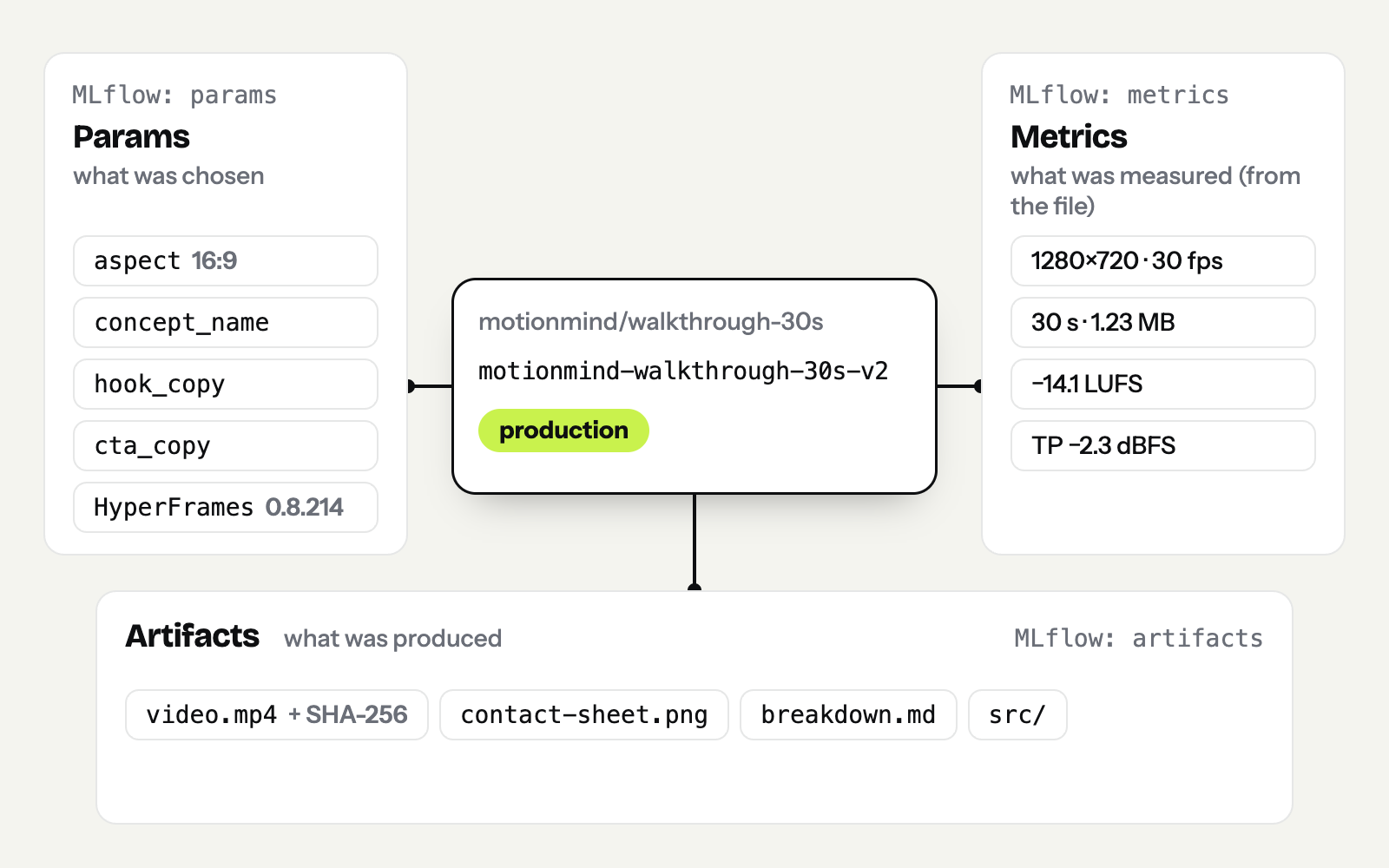
Params are the decisions that set one version apart from another. They come from three places:
aspect: 9:16, 16:9 or 1:1), the safe area for 9:16 (safe_area), and for HyperFrames projects also the HyperFrames version, composition name, resolution, duration, number of scenes and composition variables.concept_name, hook_copy, cta_copy, palette, fonts, bpm and color_logic. The Studio shows them in the Registry panel, with colour swatches for the palette.--param key=value.A practical tip: if you want the hook to appear in the "Hook" row on the Studio's version and compare pages, use the key hook_copy, not hook. Other keys are still recorded in registry.json and show up in motionmind compare.
MotionMind's most important principle: metrics are measured from the file, not reported by the agent. Before it copies anything into the workspace, motionmind log runs ffprobe and ffmpeg's ebur128 filter on the video.
| Metric | Meaning |
|---|---|
width, height, fps, frames | resolution and frame count |
duration_s, size_mb, bitrate_kbps | duration, file size, bitrate |
video_codec, audio_codec, has_audio | codecs and whether there is audio |
integrated_lufs | overall loudness (EBU R128) |
lra_lu | loudness range |
true_peak_dbfs | true peak |
render_ms | render time, for HyperFrames renders from a tracked project |
Loudness is measured only when the video has an audio track. You can add your own metrics with --metric key=number, such as an internal review score. But measurements always win: --metric integrated_lufs=-14 can't overwrite the measured loudness, because that is the number the QA gate reads.
There is one difference from MLflow. In MLflow a metric can have a history per step, such as the loss at every epoch. In MotionMind each version has one value per metric, because one version is one file. The history is the row of versions.
Every version keeps these files:
video.mp4 and its SHA-256 hash. The hash is also used to spot duplicates during autolog.contact-sheet.png: one frame per second, ten frames per row, each stamped with its time. It's the quickest way to see a whole video in one image.breakdown.md: a scene-by-scene note written by the agent.plan/design.html, if there is one.src/ snapshot: the source that produced the video.
Take two mixes of the 30-second MotionMind walkthrough: a first mix that came out too loud, and a second mix after a limiter brought it to −14 LUFS. Both are logged as versions:
motionmind log walkthrough-first-mix.mp4 --campaign motionmind/walkthrough-30s \
  --title "Walkthrough — first mix" --param concept_name="Five steps" \
  --param hook_copy="From a brief to a tracked video" --param cta_copy="npm i -g motionmind"
motionmind log walkthrough-mix-14lufs.mp4 --campaign motionmind/walkthrough-30s \
  --title "Walkthrough — mix at −14 LUFS" --param concept_name="Five steps" \
  --param hook_copy="From a brief to a tracked video" --param cta_copy="npm i -g motionmind" \
  --notes "Limiter on the music bed, gain matched to −14 LUFS."
Run 'motionmind-walkthrough-30s-v1' (staging) · projects/motionmind/walkthrough-30s/runs/v1-log-1102-1527 · 1280x720 · 30 s · -11.2 LUFS · TP 1.7
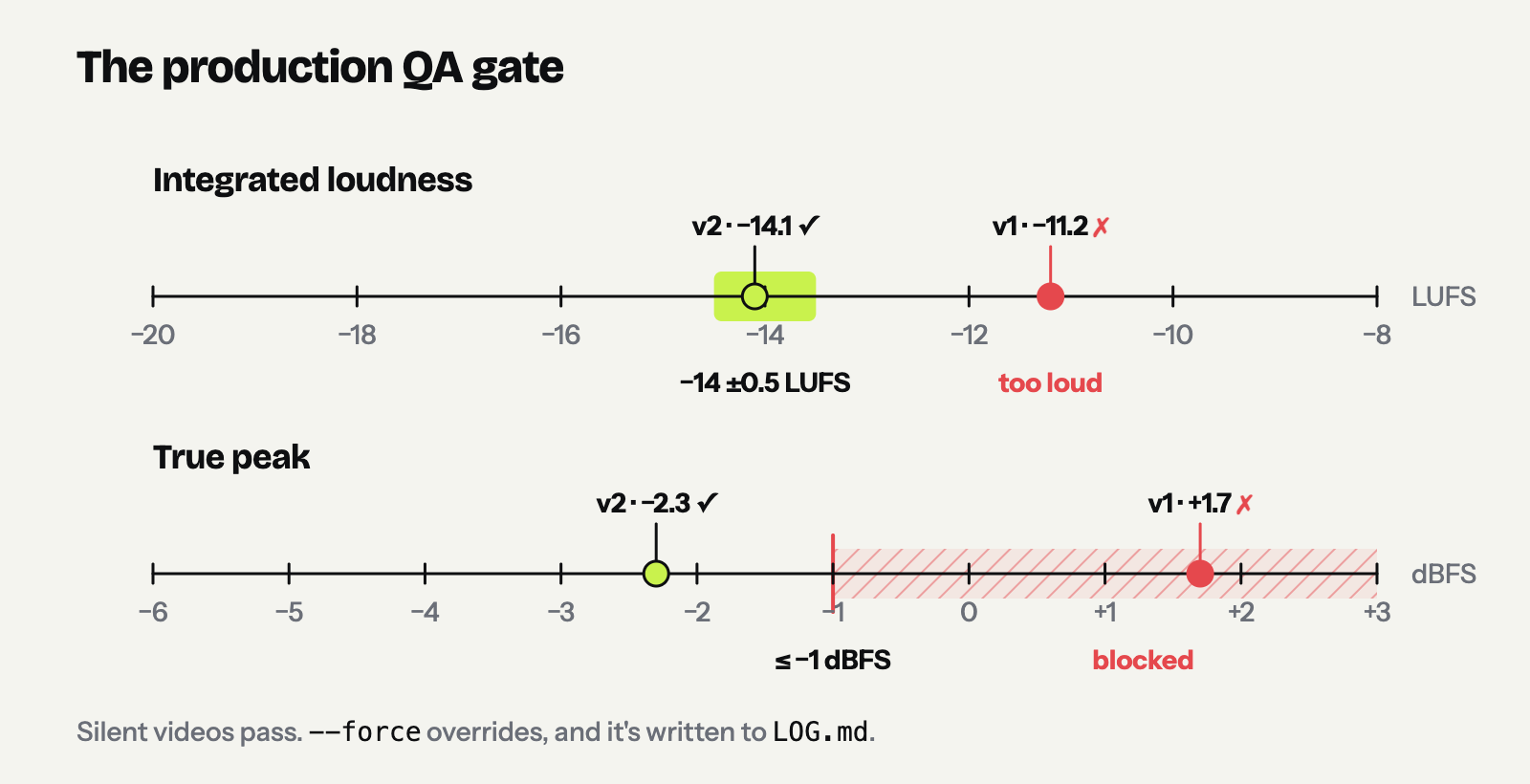
QA: -11.2 LUFS (target -14 ±0.5) · true peak 1.7 dBFS (max -1) — promotion to production is blocked until fixed (or forced).
Run 'motionmind-walkthrough-30s-v2' (staging) · projects/motionmind/walkthrough-30s/runs/v2-log-1102-1527 · 1280x720 · 30 s · -14.1 LUFS · TP -2.3
Notice that MotionMind warns you the moment the first version is logged: v1 is too loud (−11.2 LUFS) and its true peak is over the limit (+1.7 dBFS), so it can't go to production. motionmind compare shows what differs, and marks every differing row with ≠:
run_id                       motionmind-walkthrough-30s-v1                motionmind-walkthrough-30s-v2                 ≠
stage                        staging                                      staging
params.skill_engine          mp4                                          mp4
params.aspect                16:9                                         16:9
params.engine                mp4                                          mp4
params.concept_name          Five steps                                   Five steps
params.hook_copy             From a brief to a tracked video              From a brief to a tracked video
params.cta_copy              npm i -g motionmind                          npm i -g motionmind
metrics.width                1280                                         1280
metrics.height               720                                          720
metrics.fps                  30                                           30
metrics.duration_s           30                                           30
metrics.size_mb              1.23                                         1.23
metrics.integrated_lufs      -11.2                                        -14.1                                         ≠
metrics.true_peak_dbfs       1.7                                          -2.3                                          ≠
If someone tries to promote v1, the registry refuses:
$ motionmind promote motionmind-walkthrough-30s-v1 --stage production
QA failed for 'motionmind-walkthrough-30s-v1': -11.2 LUFS (target -14 ±0.5); true peak 1.7 dBFS (max -1). Fix the mix and re-render, or override (CLI: --force; Studio: the override checkbox).

$ motionmind promote motionmind-walkthrough-30s-v2 --stage production
'motionmind-walkthrough-30s-v2' → production
Every step lands in the campaign's LOG.md:
2026-11-02 15:27 · log v1-log-1102-1527 · motionmind-walkthrough-30s-v1 (staging) · 1280x720 30 s · -11.2 LUFS
2026-11-02 15:28 · log v2-log-1102-1527 · motionmind-walkthrough-30s-v2 (staging) · 1280x720 30 s · -14.1 LUFS
2026-11-02 15:28 · promote v2-log-1102-1527 · motionmind-walkthrough-30s-v2 → production
And this is v2's entry in registry.json (trimmed):
{
  "run_id": "motionmind-walkthrough-30s-v2",
  "project": "motionmind/walkthrough-30s",
  "version": "v2-log-1102-1527",
  "stage": "production",
  "created_at": "2026-11-02 15:28",
  "title": "Walkthrough — mix at −14 LUFS",
  "params": {
    "aspect": "16:9",
    "concept_name": "Five steps",
    "hook_copy": "From a brief to a tracked video",
    "cta_copy": "npm i -g motionmind"
  },
  "artifacts": {
    "mp4": "projects/motionmind/walkthrough-30s/runs/v2-log-1102-1527/video.mp4",
    "contact_sheet": "projects/motionmind/walkthrough-30s/runs/v2-log-1102-1527/contact-sheet.png"
  },
  "metrics": {
    "width": 1280, "height": 720, "fps": 30, "frames": 900, "duration_s": 30, "size_mb": 1.23,
    "has_audio": true, "integrated_lufs": -14.1, "lra_lu": 2.1, "true_peak_dbfs": -2.3
  },
  "hashes": { "mp4_sha256": "40c166f7a068c90a…" },
  "source": { "kind": "file", "file": "/tmp/exports/walkthrough-mix-14lufs.mp4" },
  "notes": "Limiter on the music bed, gain matched to −14 LUFS."
}
It's plain JSON. You can read it with jq, drop it into a spreadsheet or process it with your own scripts.
mlflow ui for rendersYou can read registry.json in a terminal, but creative decisions are made by watching. So motionmind ui opens the Studio at http://127.0.0.1:4310. It listens on your own machine only and sends nothing to the cloud.
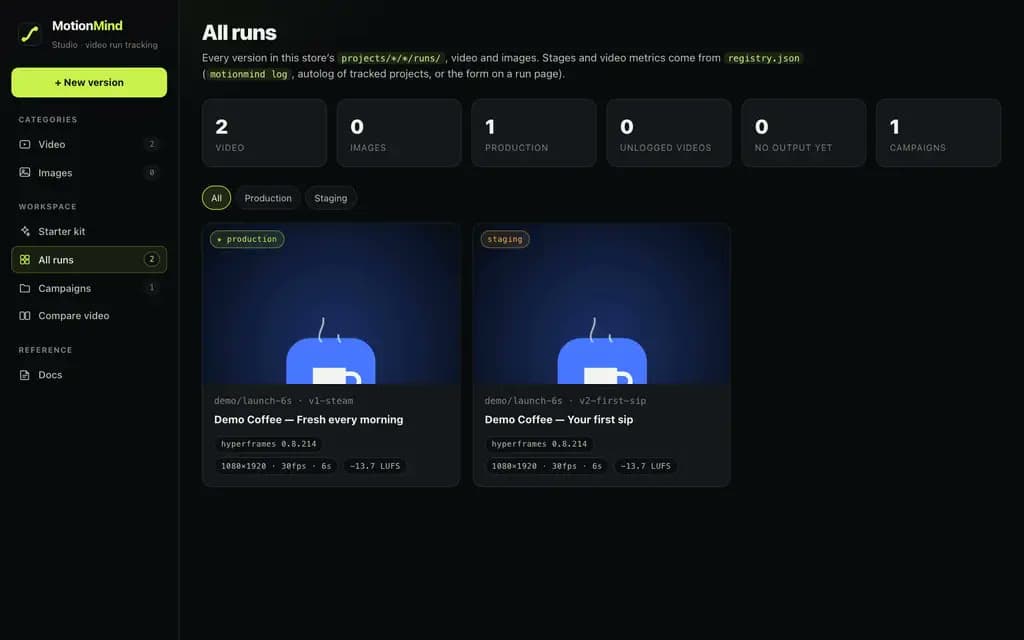
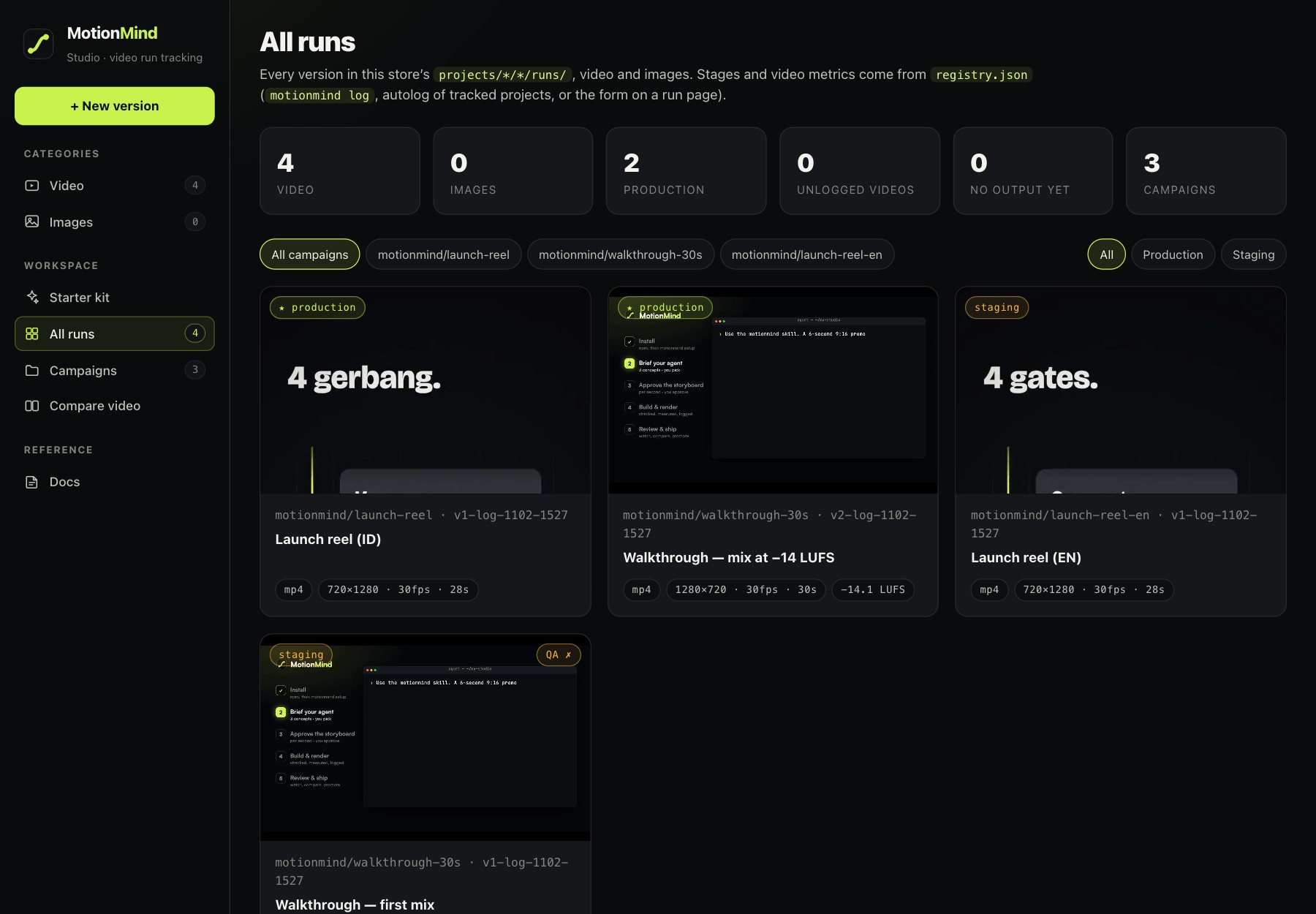
All runs. The home page shows every version as a gallery, with a summary on top: how many videos there are, how many are in production, how many videos aren't logged yet, and how many campaigns. You can filter by campaign or by status (Production, Staging, Archived, Not logged). Video thumbnails start playing when you hover over them. The order is fixed: production first, then staging, then unlogged, then archived, newest first within each group.
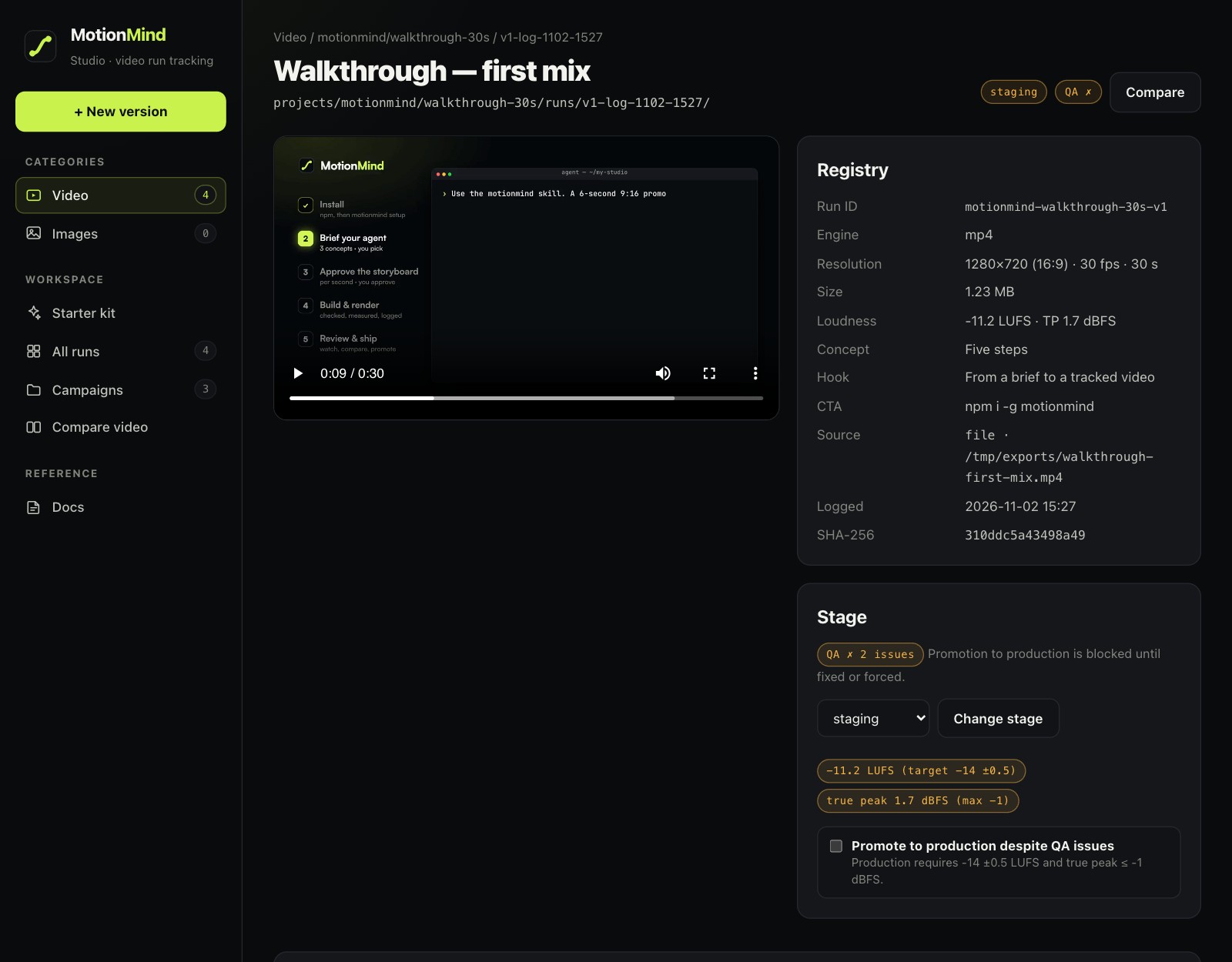
The version page. This is the counterpart of MLflow's run page: a player, a 4:5 safe-area overlay for 9:16 videos, a QA ✓/✗ badge, and a Registry panel with the run ID, engine, resolution, size, loudness, concept, hook, CTA, safe area, palette, source, logged time and SHA-256. Below that are the Stage panel (showing the exact QA issues when a version fails), the contact sheet, breakdown.md, the design board and the version's file list.
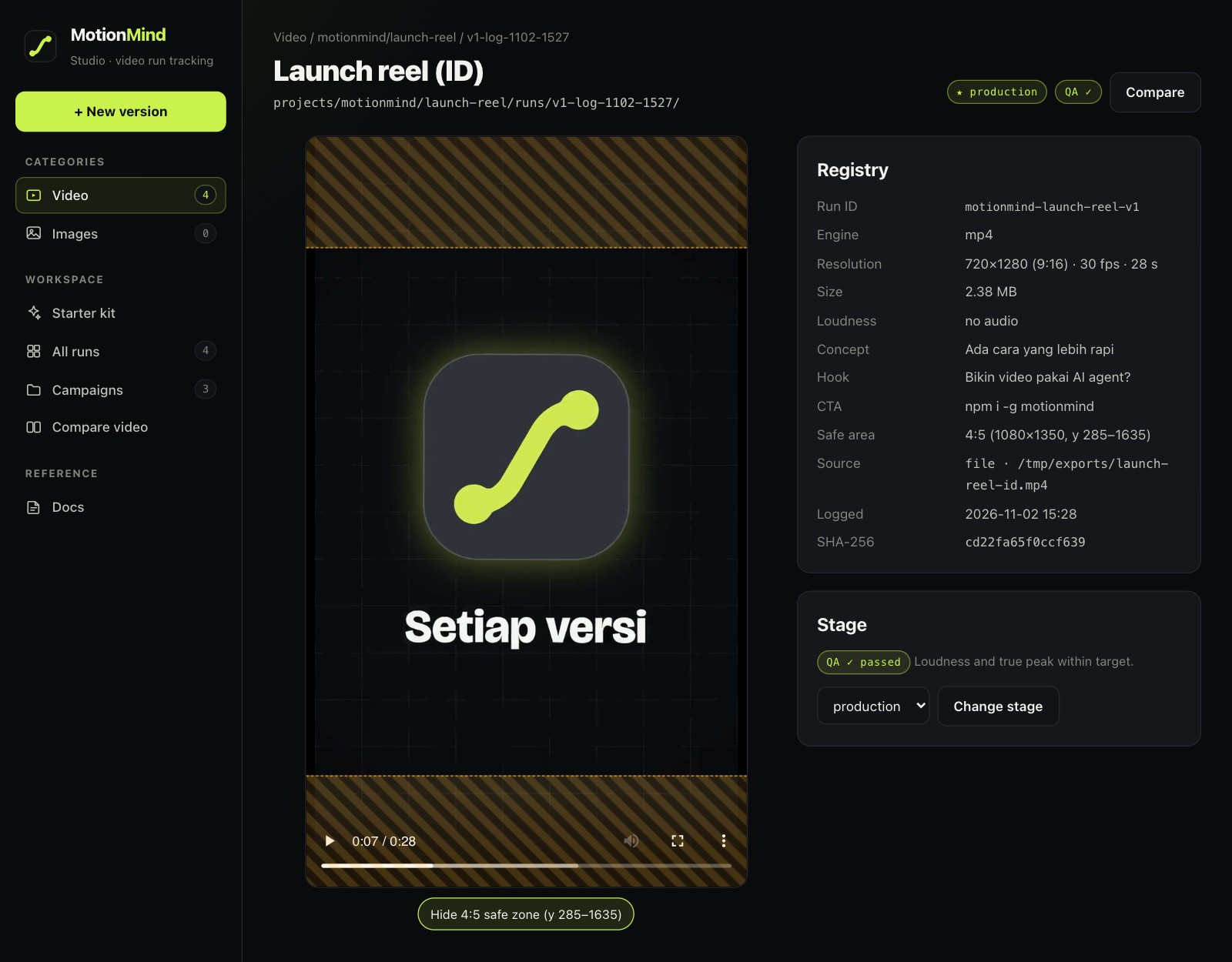
For 9:16 videos, the button under the player turns on the 4:5 safe-area overlay (y 285–1635), so you can see whether titles or the CTA fall behind a phone app's chrome:
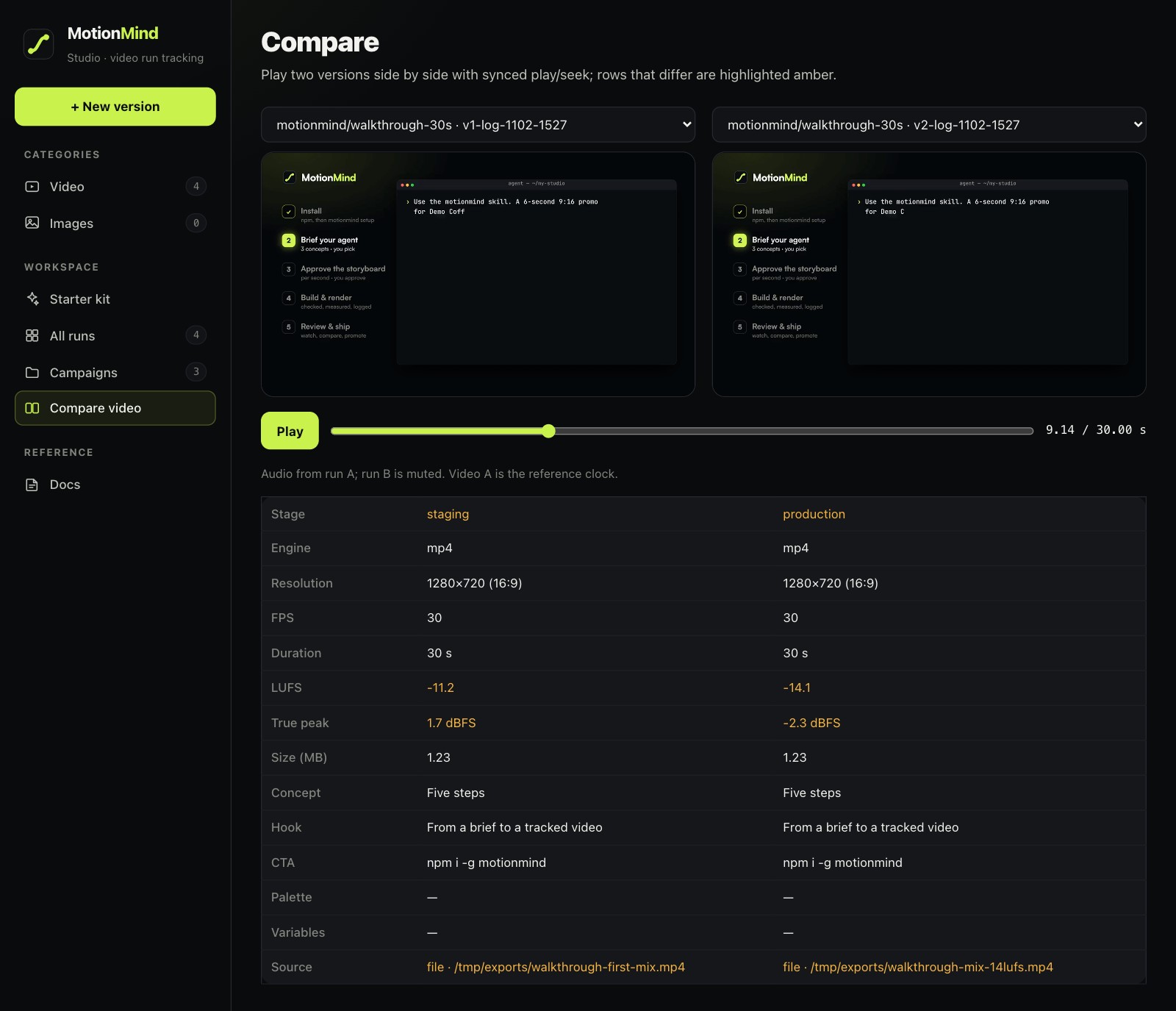
Compare. Pick two versions and they play side by side, in sync: the left video is the clock, and the right one is corrected whenever it drifts by more than 1/30 of a second. Underneath is a 14-row table (stage, engine, resolution, FPS, duration, LUFS, true peak, size, concept, hook, CTA, palette, variables, source), with differing rows highlighted in amber. In MLflow you compare loss curves. Here you watch both cuts side by side with the numbers underneath.
Campaign. The campaign page shows PROGRESS.md, the last 12 lines of LOG.md, TASTE.md and all of its versions, so you can follow the story from the first version to the latest.
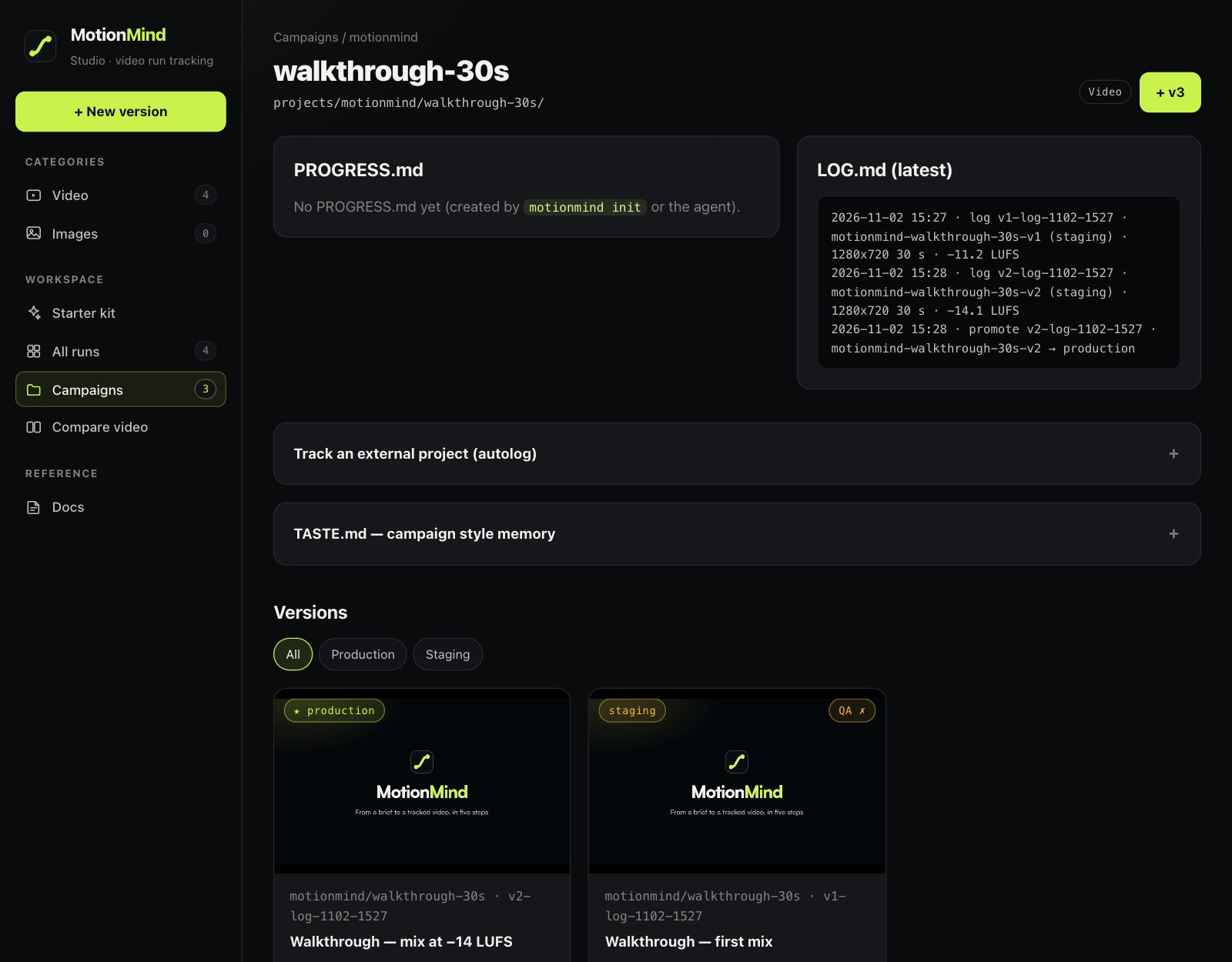
The Studio reads the workspace every time a page loads. There is no hidden database and no cache to go stale. If the agent has just logged a version, reload the page.
This is the part that matters most day to day. Every version is always in one of three stages:
staging: the default. Every new version lands here and can be reviewed.production: the version in use, such as the one posted to Instagram or sent to the client.archived: retired. It isn't deleted, just moved out of the main list.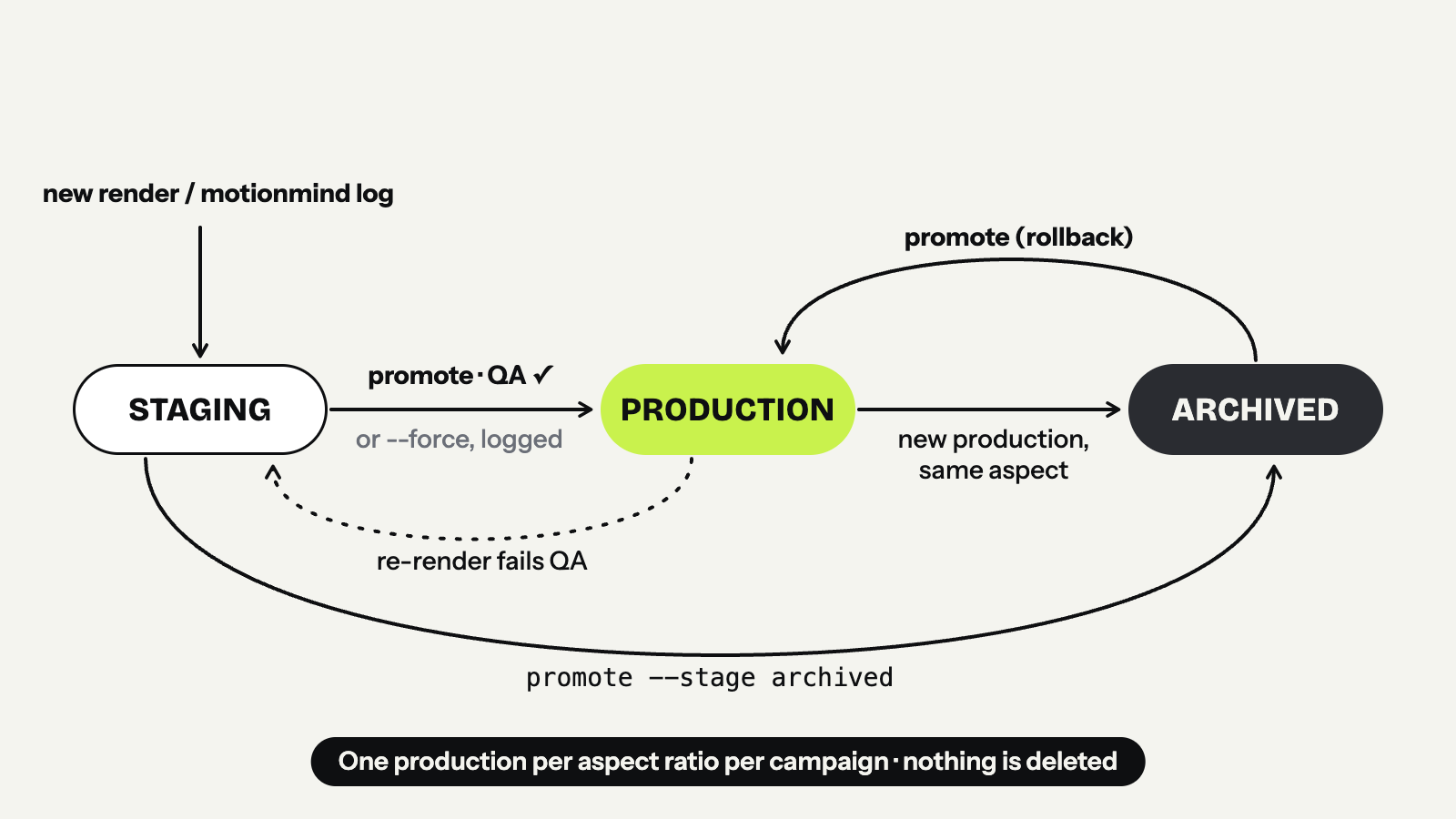 MotionMind adds three rules that standard MLflow doesn't have.
1. Production must pass QA. For a video with audio, production requires integrated loudness of −14 LUFS ±0.5 and a true peak no higher than −1 dBFS, measured from the file. Silent videos pass, because silence is a deliberate choice. You can force a promotion with --force on the CLI or a checkbox in the Studio, but the override is written to LOG.md along with the QA issues it skipped. The skill forbids the agent from using --force unless you ask for it. Loudness standards: why −14 LUFS? explains where the number comes from.
2. One production version per aspect ratio per campaign. When a new version is promoted to production, the previous production version with the same aspect ratio moves to archived automatically. A 9:16 and a 16:9 version of the same campaign can both be in production, because they go to different places.
3. Production can't quietly break. If a production version is re-rendered and the new render fails QA, it drops back to staging, and the demotion is logged.
What if the client changes their mind? Promote the archived version back to production (it still has to pass QA). It becomes the live version again, the current one moves to the archive, and everything is logged. There is no dedicated "rollback" button, because promote already does the job.
motionmind trackmlflow.autolog() exists because people forget to log. Video editors are no different. If you work in HyperFrames Studio, Premiere, CapCut or any other app that exports MP4, just point MotionMind at the project or export folder:
motionmind track ~/Movies/HyperFrames/my-video --campaign acme/launch-15s   # HyperFrames: watches renders/
motionmind track ~/Exports/premiere --campaign acme/launch-15s-cut          # any editor: watches new .mp4 files
While motionmind ui or motionmind watch is running, MotionMind checks those folders every two seconds. Each new render is logged as a staging version with its measurements. A HyperFrames render is picked up once its .meta.json file says the render is complete, which also gives you the render_ms metric. A file from another editor is picked up after it has been unchanged for three seconds, so a file that is still being written isn't logged half-done. A file identical to an existing version (checked by hash) is skipped. The full guide is tracking renders from other apps.
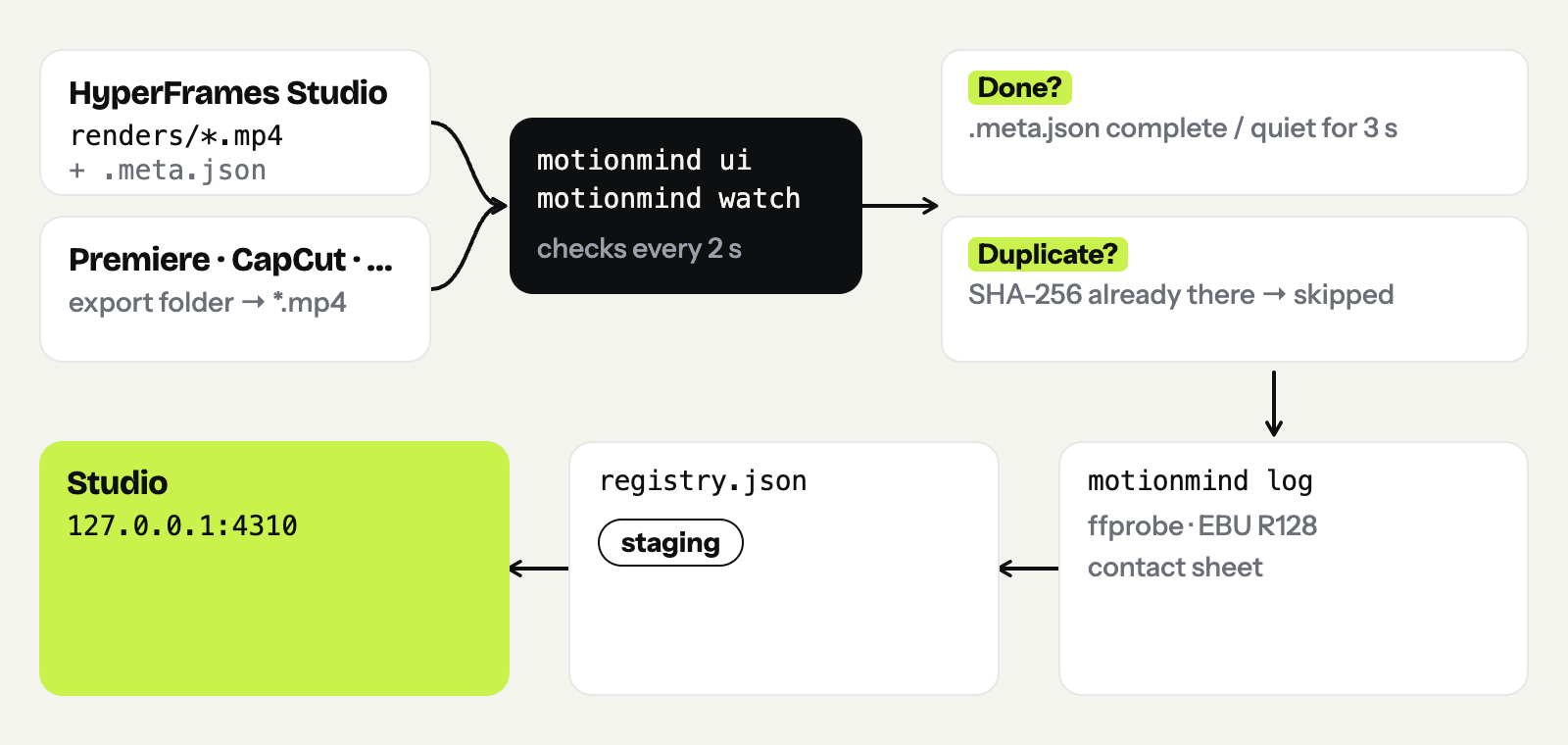
On an ML team, MLflow is only useful if people actually log their runs. In MotionMind the agent does the logging, and the skill keeps it disciplined:
motionmind log.staging and runs promote --stage production only after you approve at Gate 4..editing.json file tells the agent not to touch it.The result is a registry that stays tidy even with dozens of versions across several chat sessions. The full flow is in the four-gate workflow.
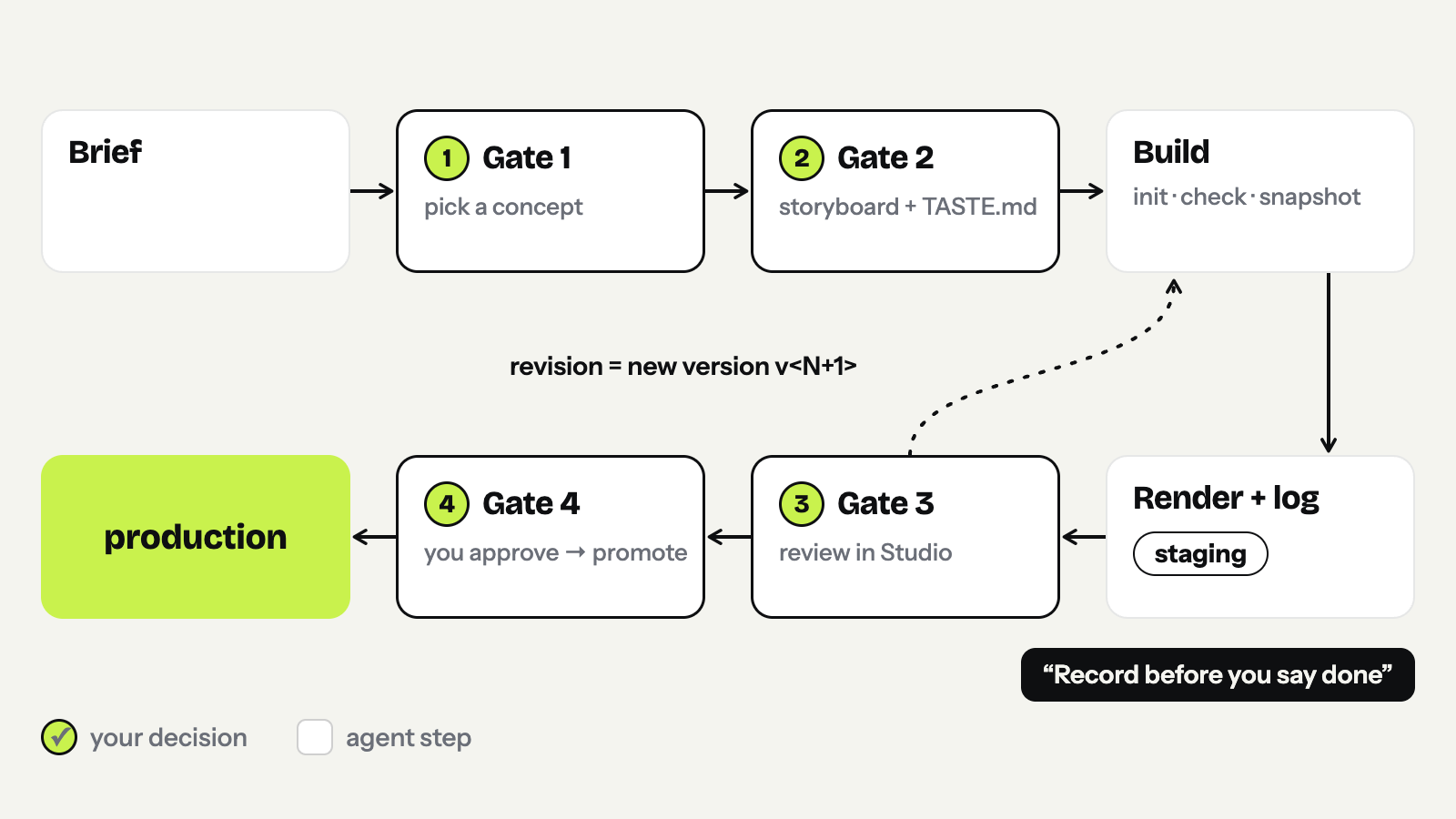
MLflow is a big platform, and MotionMind is small on purpose. To set expectations, here is what MotionMind 0.2.0 does not have:
--param or --notes for free-form labels.source field (where the file came from), its src/ snapshot and LOG.md.127.0.0.1.If any of these matters for your workflow, tell us on GitHub Issues.
You need Node.js 22 or newer, and ffmpeg and ffprobe on your PATH.
npm i -g motionmind
motionmind setup my-studio
cd my-studio
motionmind ui
Then, in a second terminal in the same folder, log any video you already have:
motionmind log ~/Downloads/my-video.mp4 --campaign try/first --param hook_copy="First hook"
motionmind list
Reload the Studio and your video is there, with its measurements. If its loudness is off from −14 LUFS, you'll know straight away.
MLflow taught data scientists to stop overwriting experiments. MotionMind tries to teach the same thing to the agent that makes your videos: every render is an experiment, every experiment is recorded, and the version in use is always chosen on purpose, by you.